


For applications that require family consent through the online store or My Y!mobile system eliminates the need to print and fill out a paper consent form, making it easier for family members to give consent than through a dedicated website.
Online consent is available for the following services and contracts.
This is a method to use online consent when applying for a new contract, Changing devices, MNP, or number transfer procedures at the online store.
| Services and contracts that allow online consent |
|---|
| Family discount |
| Home Bundle Discount Hikari Set (A) |
| Applications where the payer's name is different from the contract holder |
Please enter the names and email addresses of your family members who agree to the terms and conditions and complete your application.
After completing your application, please give your family the consent access code that will be sent to you by email.
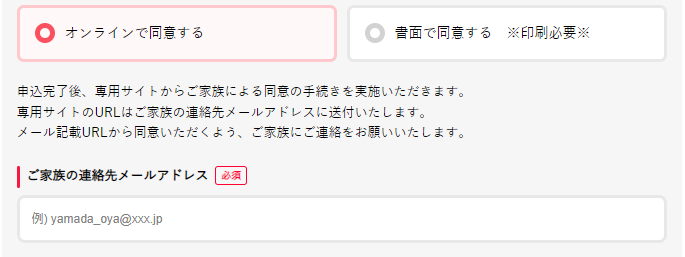

We will send the URL of the dedicated site to your family's email address.
Enter the consent access code, check the contents, and then agree.

We will confirm the details you have agreed to and then proceed with the review and registration procedures for the service and contract.
When using online consent, please check the following precautions and inform your family in advance.
This is a method to use online consent when completing procedures using your current line.
| Services that allow online consent |
|---|
| Family discount |
Please enter the name, phone number, and email address of the family member who will give their consent, and then complete your application.
After completing your application, please share the "family access code" that will be sent to you via email with your family members.
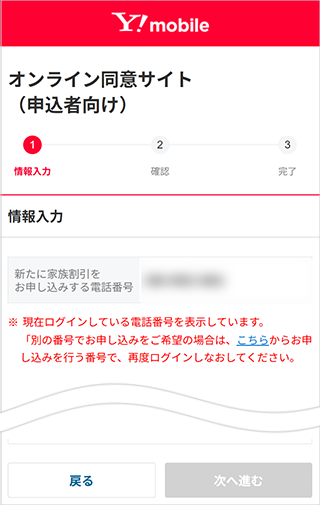
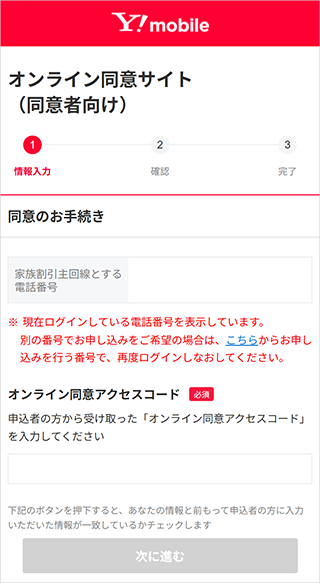
We will send the URL of the dedicated website to your family member's email address.
After logging in to the dedicated website, enter the "Family Access Code," review the contents, and complete the agreement.
After you have given your consent, we will send you an "Consent Completion Code" via email.
Apply for Family Discount service through My Y!mobile. To agree to Family Discount service, select "Agree Online," enter the "Agreement Completion Code" you received in STEP 3, and then submit your application.
When using online consent, please check the following precautions and inform your family in advance.