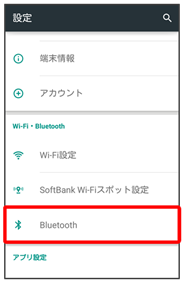
アプリシートで
(設定)
Bluetooth
Bluetooth
®
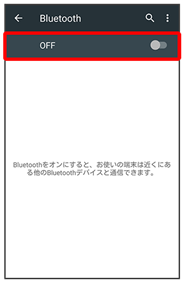
画面が表示されます。
OFF
Bluetooth
®
機能が有効になります(
ON
表示)。
Bluetooth
®
機能を無効にするときは、
ON
をタップします(
OFF
表示)。
関連項目を見る
Bluetooth
®
接続時の操作
ほかの機器に表示される本機の名称を設定する
Bluetooth
®
画面でアクションバーの
この端末の名前を変更
名前を入力
名前を変更
「Bluetooth」がONのときに設定できます。
名前に絵文字を入力すると、名前を変更できない場合があります。
aptX
®
を優先的に利用するかどうかを設定する
Bluetooth
®
画面でアクションバーの
aptX
aptX
OK
「Bluetooth」がONのときに設定できます。
aptX
をタップするたびに、有効(
)/無効(
)が切り替わります。
設定後に接続した機器に反映されます。接続済みの機器はいったん切断してから、接続し直してください。
通話時に、常にハンズフリー機器を利用して通話するかどうかを設定する
Bluetooth
®
画面でアクションバーの
常にハンズフリー通話
「Bluetooth」がONのときに設定できます。
常にハンズフリー通話
をタップするたびに、有効(
)/無効(
)が切り替わります。
常にハンズフリー通話
を有効にすると、着信時に本機とハンズフリー機器の両方が着信状態になり、本機で電話を受けてもハンズフリー機器から通話できます。無効にすると、電話を受けた機器で通話します。
こんなときは
Q.
Bluetooth
®
機能を利用できない
A.
機内モードを設定していませんか。Bluetooth
®
機能をONにした状態で機内モードを設定すると、いったん、Bluetooth
®
機能はOFFになります。
ページの先頭へもどる
 アプリシートで
 (設定)Bluetooth
 OFF
OFF
 表示)。をタップします(OFF表示)。
 アプリシートで(設定)Bluetooth
 OFF
表示)。をタップします(OFF表示)。
OFF
表示)。をタップします(OFF表示)。


 )/無効(
)/無効( )が切り替わります。