





Changing devices

This page provides information on how to transfer the eSIM from your current model to a newly purchased model.
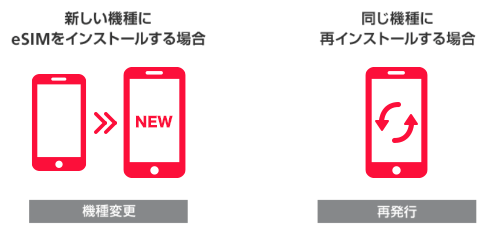
What is eSIM Changing devices?

Changing devices means installing an eSIM on a different model than the one you signed up for. Installing an eSIM on a different model requires a new profile, so you must go through the process of Changing devices.
If the model is the same brand and model but has a different IMEI, it will be considered a "new model" and you will need to go through the process of Changing devices.

Examples of Changing devices
  • ■ Available at the online store (if purchasing a device at the same time)
  • ・ iPhone ↔ Android smartphone
  • ・ iPhone 12 ↔ iPhone 12 mini
  • ・ OPPO Reno7 A ↔ OPPO Reno9 A
  • ・ Other companies' smartphones (eSIM only) → Smartphones sold by Y!mobile

etc.

  • ■ Applications can only be made in-store (if applying for eSIM only)
  • ・Smartphones sold Y!mobile → Smartphones from other companies (eSIM only)
  • ・ Other company's smartphone (eSIM only) ↔ Other company's smartphone (eSIM only)

etc.

If your eSIM has been erased for some reason, such as repair, and you are reinstalling it on the same model as when you signed up, it will need to be reissued. Please see the page on how to reissue an eSIM.

  • *Please note that Changing devices is different from reissuing it.

If you wish to change from an eSIM to a USIM card

Changing from an eSIM to a USIM card is also accepted as a "Changing devices."
If you are interested, please complete the procedure at Y!mobile shop.

Procedures for Changing devices

1. Online store procedure

Y!mobile Online Store Online Store accepts this only when you purchase a device at the same time.
If you are changing your eSIM only and not purchasing a new model, please visit a Y!mobile shop.

  • *There is a fee for Changing devices at Y!mobile shop (Changing devices with eSIM only are not accepted at the online store. They are only accepted at Y!mobile shops, so please visit Y!mobile shop).
  • *Please note that eSIM Changing devices cannot be made on the self-service site.

2. Install the eSIM on your new device

After applying, please follow the steps in "How to set up eSIM" to install it on your new device.