This system allows for voice calls and other communications on compatible devices by using the communication networks of other domestic telecommunications carriers * in the event that SoftBank 's communication network becomes unavailable due to disasters, communication failures, etc.
*This refers to NTT DOCOMO, KDDI, Okinawa Cellular Telephone, and Rakuten Mobile, Inc.
• "JAPAN Roaming™" is offered in either "Full Roaming" or "Emergency Call Only" modes. The services available under each mode are as follows:
Full roaming
Voice Calls
◯
Includes emergency calls (110/118/119)
SMS
◯
Data/Email (MMS)
◯
Communication speed: Maximum 300kbps for both sending and receiving data.
Emergency call only system
Voice Calls
△
Only emergency calls (110/118/119) can be made.
SMS
×
Data/Email (MMS)
×
• "JAPAN Roaming™" will only be available in areas experiencing communication disruptions.
- The availability status of "JAPAN Roaming™" will be announced in the "Service Status" section. View outage information
Usage fee
Call/data charges are based on your subscribed Price Plan and discount services.
Compatible models
This page provides information on the compatibility of JAPAN roaming™ Y!mobile sold devices.
Please check here for models sold SoftBank. For models sold by other companies, please contact the respective retailer.
You can check the compatible features by selecting your device model from the dropdown menu below. Please note that these results do not guarantee all features.
The compatibility results are indicated with "◯" if the voice call, data communication, and SMS functions were confirmed to work on our sold models, or if the function was confirmed through technical standards compliance certification after October 2025. If a feature was unavailable during the functional testing, or if it was not verified, it is indicated with "×". Even if it is marked with "×", it may still be available.
- On some non-iOS devices, you will need to enable data roaming (if you cannot use data communication, please enable data roaming).
• Basic functions will be in accordance with the specifications of each model.
• Information regarding compatible models for the emergency call-only system may be updated. You can check the list of compatible models for updates.
• The SMS function is indicated as "◯" and includes only SMS reception.
The information provided is current as of March 18, 2026 (Wednesday).
• Some models will have updated information after March 18th (Wednesday), so please check the individual model information for details.
Please select your model from the dropdown menu below to check the compatible features.
Network information of each company
The coverage area during roaming is based on the coverage area of the connected roaming partner.
The roaming partners are as follows:
Partner business
technology
display name
docomo
Full roaming
"JPN-ROAM D", "JpnRoamD", or "44091"
Emergency call only system
"NTT DOCOMO", "DOCOMO", or "44010"
KDDI
Full roaming
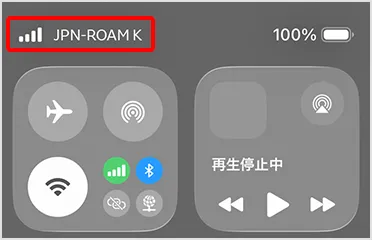
"JPN-ROAM K", "JpnRoamK", or "44092"
Emergency call only system
"KDDI", "KDDI_50", or "44050"
Rakuten Mobile
Full roaming
"JPN-ROAM R", "JpnRoamR", or "44094"
Emergency call only system
"Rakuten" or "44011"
Please refer to "How to Use" for instructions on selecting your connection destination.
How to use
This guide explains how to connect to and terminate the full roaming mode and the emergency call-only mode.
Full roaming
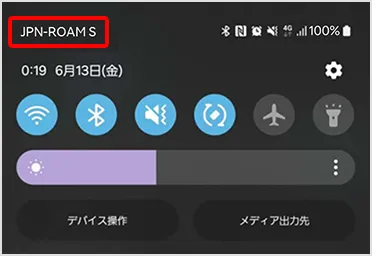
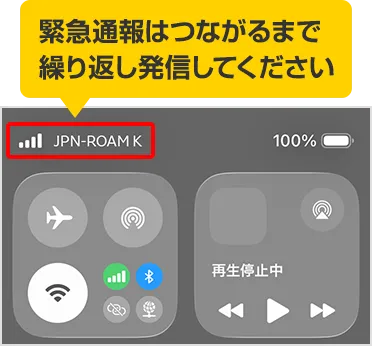
The automatically selected network will be displayed. If it is not selected automatically, you can also select it manually.
For details on each connection method, please see below.
- On some non-iOS devices, you will need to enable data roaming (if you cannot use data communication, please enable data roaming).
Auto Select
iPhone
The automatically selected network will be displayed.
Manual selection is possible, but if you select manually, you may not be able to connect to the normal network unless you switch back to automatic selection after the service ends. Please switch the setting back to automatic selection after the service ends.
If an automatic selection is not possible, you can also select it manually. In the carrier selection menu, please select a network that contains either the string "JPN-ROAM" or "JpnRoam" or the 5-digit number sequence "4409".
Android
The automatically selected network will be displayed.
- On some non-iOS devices, you will need to enable data roaming. (If you are unable to use data communication, please enable data roaming.)
*Settings vary depending on the model. Please select your model on the "Product List" page, then check the instruction manual located under "Product Information" > "Support".
Manual selection is possible, but if you select manually, you may not be able to connect to the normal network unless you switch back to automatic selection after the service ends. Please switch the setting back to automatic selection after the service ends.
If an automatic selection is not possible, you can also select it manually. In the carrier selection menu, please select a network that contains either the string "JPN-ROAM" or "JpnRoam" or the 5-digit number sequence "4409".
Manual Selection
iPhone
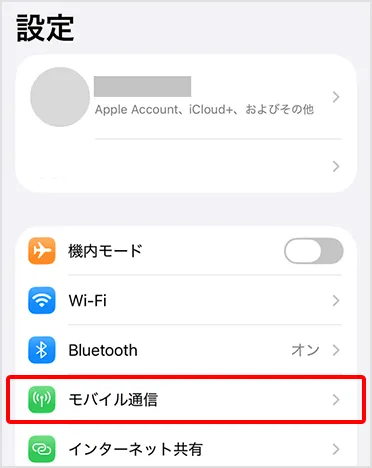
STEP 01
Open "Settings" and tap "Cellular Data".
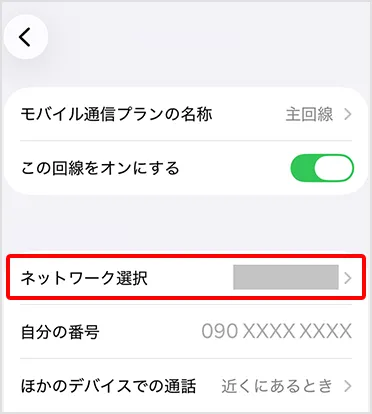
STEP 02
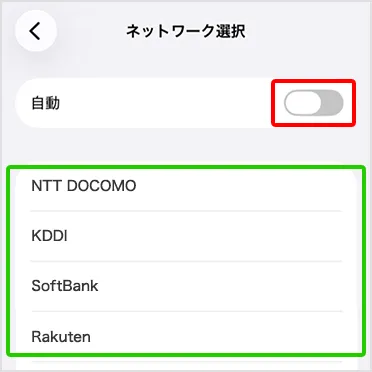
Tap "Network Selection"
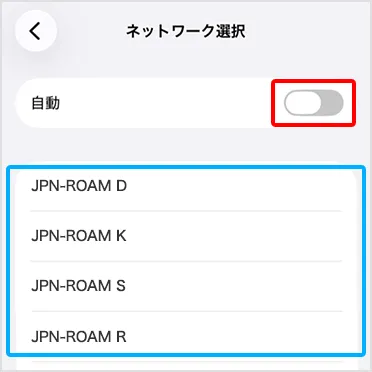
STEP 03
Turn "Automatic" to "OFF" and select the carrier network for JAPAN Roaming™.
・It may take some time for the carrier network to be displayed.
Please try this only if automatic connection fails. Select either a string containing "JPN-ROAM" or "JpnRoam", or a 5-digit number sequence containing "4409".
STEP 04
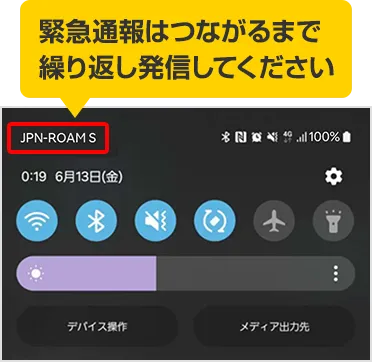
In full roaming mode, the name of the selected JAPAN roaming™ compatible carrier will be displayed.
STEP 05 (How to end the process)
Please try setting the carrier selection menu to "Automatic" or selecting your contracted telecommunications carrier manually.
If the device does not automatically revert to "Automatic" mode, try tapping the airplane mode button to turn airplane mode on and off.
Android
STEP 01
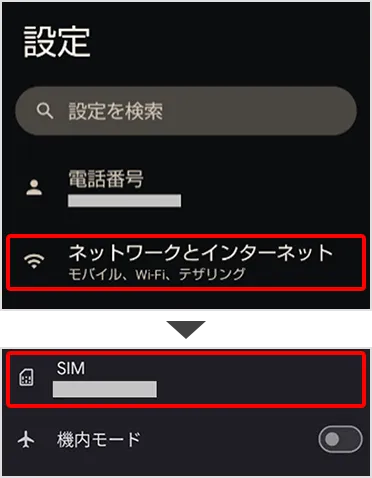
Open "Settings," tap "Network & Internet," and then tap "SIM" or "Mobile Network" on the screen that opens.
STEP 02
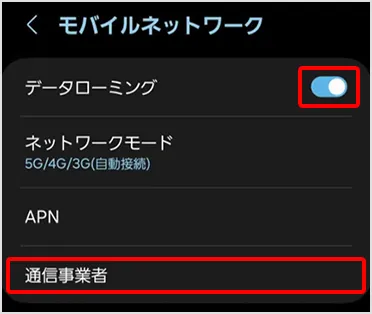
Tap "Carrier" or "Mobile Carrier". If you are using full roaming, turn on data roaming.
Please note that traveling abroad with data roaming enabled may result in unexpected data usage.
Some devices can be used even with data roaming turned off.
STEP 03
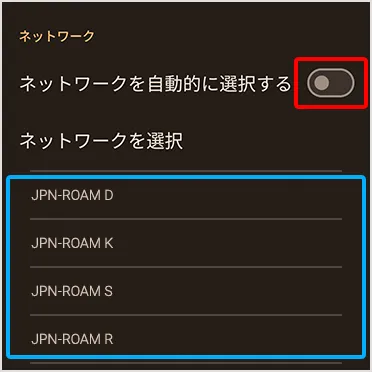
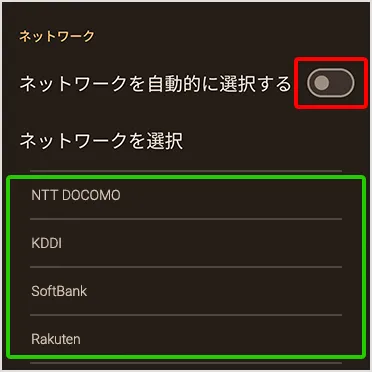
Turn off "Automatic" and select the carrier network for JAPAN Roaming™.
・It may take some time for the carrier network to be displayed.
Please try this only if automatic connection fails. Select either a string containing "JPN-ROAM" or "JpnRoam", or a 5-digit number sequence containing "4409".
STEP 04
In full roaming mode, the name of the selected JAPAN roaming™ compatible carrier will be displayed.
STEP 05 (How to end the process)
Please try setting the carrier selection menu to "Automatic" or selecting your contracted telecommunications carrier manually.
If the device does not automatically revert to "Automatic" mode, try tapping the airplane mode button to turn airplane mode on and off.
Emergency call only system
Connection is only possible via manual selection *1.
For details on each connection method, please see below. For detailed connection methods and specific operating procedures, please refer to the instructional video at the bottom of the page.
*1 In some cases, you may be able to make a call with automatic selection enabled.
Manual Selection
iPhone
STEP 01
Open "Settings" and tap "Cellular Data".
STEP 02
Tap "Network Selection"
STEP 03
Turn "Automatic" to "OFF" and select the carrier network for JAPAN Roaming™.
・It may take some time for the carrier network to be displayed.
Please select one of the following options and try it: "NTT DOCOMO", "DOCOMO", "44010", "KDDI", "KDDI_50", "44050", "SoftBank", "44020", or "Rakuten", "44011". The displayed content may vary depending on the model.
STEP 04
In emergency call-only mode, you can still make calls even if the "No Service Area" indicator is displayed.
STEP 05 (How to end the process)
After using the emergency call-only method, please change the network selection method back to "automatic selection".
If you do not revert the settings, you will not be able to use normal communication after the JAPAN Roaming™ service ends.
Android
STEP 01
Open "Settings," tap "Network & Internet," and then tap "SIM" or "Mobile Network" on the screen that opens.
STEP 02
Tap "Carrier" or "Mobile Carrier". If you are using full roaming, turn on data roaming.
Please note that traveling abroad with data roaming enabled may result in unexpected data usage.
Some devices can be used even with data roaming turned off.
STEP 03
Turn off "Automatic" and select the carrier network for JAPAN Roaming™.
・It may take some time for the carrier network to be displayed.
Please select one of the following options and try it: "NTT DOCOMO", "DOCOMO", "44010", "KDDI", "KDDI_50", "44050", "SoftBank", "44020", or "Rakuten", "44011". The displayed content may vary depending on the model.
STEP 04
In emergency call-only mode, you can still make calls even if the "No Service Area" indicator is displayed.
STEP 05 (How to end the process)
After using the emergency call-only method, please change the network selection method back to "automatic selection".
If you do not revert the settings, you will not be able to use normal communication after the JAPAN Roaming™ service ends.
Explanation video
Notes:
This service is a best-effort service, and communication speed and quality may vary depending on usage conditions and environment; a consistent communication level is not guaranteed at all times.
This service aims to secure communication means for as many customers as possible and provide relief in the event of disasters or communication failures, but it does not guarantee 100% connectivity.
This service is an alternative means of communication in the event of a disaster, etc. Please use it in conjunction with other alternative means such as landlines, public telephones, fixed internet connections, and 00000JAPAN.
This service is available on 4G (LTE) networks.
The service area is the area designated by our company within the 4G communication service areas of other companies (excluding some areas such as BWA). Details regarding the service area and service period will be announced on our website as needed, taking into account the status of any service disruptions. View outage information
- You may not be able to use services such as "Location Navi" or other services that determine the location of your device. You may also not be able to use other services that use our equipment.
This service is provided in coordination with other companies, so it may not be immediately available in the event of a disaster or communication failure, and it may take some time before you can start using it.
This service may allow you to make emergency calls (110/118/119) even if the antenna icon (pictogram) is not displayed on the device screen.
- If you make an emergency call without an antenna icon (pictogram) displayed on your device screen, the emergency services (110/118/119) will not be able to call you back.
When connected using full roaming
This service is provided in accordance with the fees and other terms and conditions of Price Plan and optional services you have subscribed to.
• Some models may not be able to use all or part of the full roaming feature. For details on compatible models and features/contents that cannot be used, please check the Compatible Models section.
- You may not be able to make calls to numbers that start with # or numbers that start with 0120/0800/0570/0077-7.
- On some models, it may not be possible to make emergency calls (110/118/119) or to make emergency calls with 184/186 added.
• Data usage is added to your normal data usage and handled according to your subscribed Price Plan. The total data usage after this addition will determine whether you have reached your data limit.
The communication speed is a maximum of 300kbps for both sending and receiving data.
- On some non-iOS devices, you will need to enable data roaming (if you cannot use data communication, please enable data roaming).
- There is a possibility that previously received earthquake early warnings or other emergency alerts may be received again or sound again.
If your device is unable to receive emergency earthquake warnings or other alerts while connected to another company's communication network, your service provider will notify you separately.
• SMS availability varies depending on the device model. Please check the compatible devices section for details.
- If the device cannot connect to our company's communication network when powered on, it will automatically attempt to connect to another company's communication network (JAPAN Roaming™).
When connecting using the emergency call only method
- We cannot call back emergency services (110/118/119) that received your call.
- It may not be possible to make emergency calls (110/118/119) with 184/186 added.
- Your IMSI (International Mobile Subscriber Identity) may be shared with emergency services.
- Some models may not be able to use all or part of the emergency call-only system. For details on compatible models and the functions/contents that cannot be used, please check the compatible models section.
Models that support emergency call-only systems are expected to be released in spring 2026 or later.
Even if an emergency call-only system is provided, your device may not be able to recognize that situation.
• You will not be able to connect without manually selecting the connection method, so please check the instructions for use.
If you connected manually, please change the network selection method back to "Automatic Selection". If you do not change the setting back, you will not be able to use normal communication after the JAPAN Roaming™ service ends.
Depending on the situation, you may need to dial multiple times before your emergency call connects. If you are unable to connect, please move to a different location and try again.
With the launch of this service, we will revise our Terms and Conditions and Terms of Service.
(1) Effective date April 1, 2026
(2) Changes
① The following terms and conditions will be amended to include a clause regarding "JAPAN Roaming™" as an additional feature.
-Y!mobile Communication Service Agreement (Telephone Service) (Type 1 & 2)
[Added section] Appendix 1 Additional Functions 1-1 Telephone Service (Type 1) and Y!mobile Specific Business Communication Services
[Additional text] JAPAN Roaming™ feature: Terms and conditions of service are as separately determined by our company.
-Y!mobile Communication Service Agreement (Data Communication Service Section)
[Added section] Appendix 2 Provision of additional functions (related to Article 23)
[Additional text] JAPAN Roaming™ feature: Terms and conditions of service are as separately determined by our company.
• EMOBILE Communication Service Agreement Terms and Conditions (EMOBILE 4G-S Edition)
[Added section] Appendix: Additional Functions
[Additional text] JAPAN Roaming™ feature: Terms and conditions of service are as separately determined by our company.
• EMOBILE Communication Service Agreement (EMOBILE 4G Edition)
[Added section] Appendix 2 Provision of additional functions (related to Article 22)
[Additional text] (3) Additional functions will be provided based on the terms and conditions specified in the following table. JAPAN Roaming™ feature: Terms and conditions of service are as separately determined by our company.
• EMOBILE Communication Service Agreement (EMOBILE LTE Edition) (Data)
[Added section] See separate document
[Additional text] 18. Provision of additional functions (1) JAPAN Roaming™ function: The terms and conditions of service will be as separately determined by our company.
• EMOBILE Communication Service Agreement (Data Communication Section)
[Added section] Appendix 2 Provision of additional functions
[Additional text] (2) Additional functions will be provided based on the terms and conditions specified in the following table. JAPAN Roaming™ feature: Terms and conditions of service are as separately determined by our company.
② We will establish new terms and conditions for the provision of this service. For details, please refer to the "JAPAN Roaming™" Terms and Conditions.